How AI Receptionists Capture Leads and Caller Details
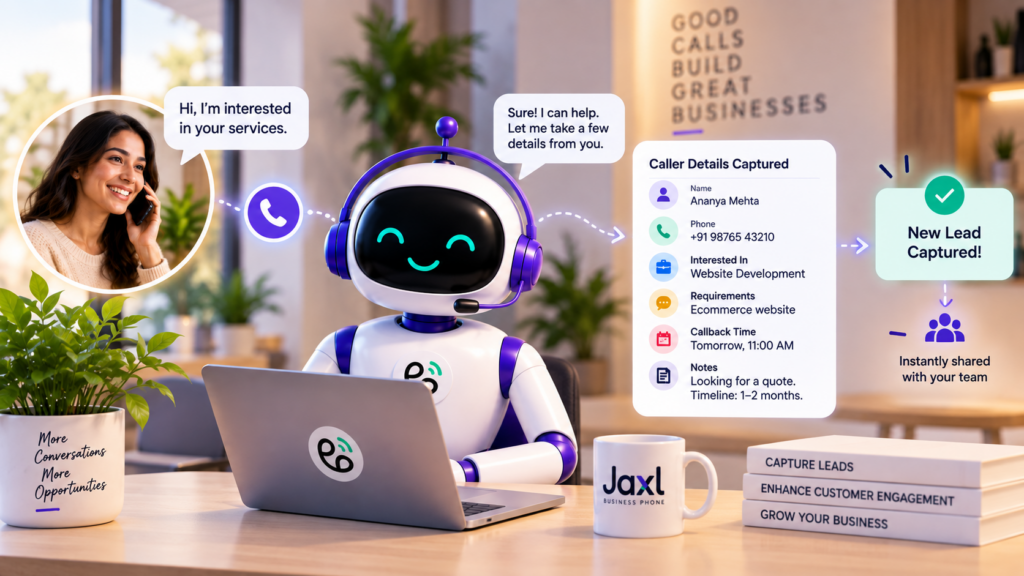
AI lead capture helps businesses collect valuable customer information directly from incoming phone calls. Instead of simply answering a call and transferring it—or worse, letting it become a missed call—an AI receptionist can understand why someone is calling, collect their details, and record the information your team needs for follow-up.
For small businesses, this can make a major difference.
A potential customer calling your business is already showing intent. They may be asking about your services, requesting a quote, looking for an appointment, or trying to buy something. If that conversation isn’t captured properly, the opportunity can easily be lost.
An AI receptionist can turn an ordinary phone call into a structured lead that your team can follow up with.
What Is AI Lead Capture?
AI lead capture is the process of using artificial intelligence to collect and organize information from potential customers during a conversation.
An AI receptionist can ask relevant questions and record information such as:
- Caller name
- Phone number
- Reason for calling
- Service or product they’re interested in
- Preferred callback time
- Location or address
- Additional requirements
- Notes about the conversation
Instead of your team having to remember everything from a call, the important information can be captured automatically.
Why Phone Calls Are Valuable Leads
A website visitor might browse your website and leave without contacting you.
A person who calls has taken an additional step.
They may already be interested enough to:
- Ask about pricing
- Request a quote
- Book an appointment
- Check availability
- Ask about a product
- Report a problem
- Request a callback
This makes phone calls particularly valuable for many small businesses.
The challenge is making sure those conversations turn into actionable information.
What Happens When a Business Misses a Lead Call?
Imagine someone searches for a service, finds your business, and calls.
Nobody answers.
The customer might:
- Leave a voicemail.
- Try again later.
- Send a message.
- Call another business.
There is no guarantee they’ll try again.
Even when someone answers the call, another problem can occur: the customer’s information may not be recorded correctly.
An AI receptionist can help prevent both problems.
How an AI Receptionist Captures a Lead
A typical lead-capture conversation might look like this:
Customer:
“Hi, I’m looking for a website development company.”
AI receptionist:
“I’d be happy to help. May I have your name?”
Customer:
“Rahul.”
AI receptionist:
“Thanks, Rahul. What kind of website are you looking to build?”
The AI can continue asking relevant questions based on the business’s configured workflow.
At the end of the call, the business has much more than a phone number.
It has context.
What Caller Details Can an AI Receptionist Capture?
The information you collect depends on your business and the purpose of the call.
Caller Identity
The AI can record the caller’s identity so your team knows who they are speaking with.
For example:
- Name
- Phone number
- Existing customer status
Reason for Calling
This is one of the most important pieces of information.
The AI can record whether the caller is:
- Looking for a product
- Requesting a service
- Booking an appointment
- Asking for a quote
- Following up on an existing issue
- Making a complaint
Contact Information
The caller’s phone number can be associated with the conversation so the team can follow up.
Preferred Callback Time
If the right person isn’t available, the AI can ask:
“When would be a convenient time for someone from our team to call you back?”
This creates a much more useful follow-up request.
Additional Notes
The AI can record relevant information that may help your team understand the lead.
For example:
“Customer is interested in a three-bedroom property and would like to schedule a viewing this weekend.”
That’s considerably more useful than:
“Missed call from customer.”
AI Lead Capture Can Qualify Inquiries
Capturing a lead doesn’t necessarily mean collecting only a name and phone number.
An AI receptionist can also ask questions that help your team understand the lead.
For example, a real estate business might ask:
- Are you looking to buy or rent?
- Which location are you interested in?
- What type of property are you looking for?
- What is your approximate budget?
A home-service business might ask:
- What service do you need?
- Where is the property located?
- Is this an urgent request?
- When would you like someone to visit?
The answers provide useful context before a human team member follows up.
Lead Capture Without Making the Call Feel Like a Form
There is an important difference between a conversational AI receptionist and a traditional form.
A form might ask:
Name?
Phone?
Email?
Requirement?
A conversational AI can collect similar information naturally as part of the conversation.
For example:
“Sure, I can arrange a callback. Could I get your name first?”
Then:
“And what would you like to discuss with our team?”
The customer isn’t necessarily thinking about the information they’re providing.
They’re simply having a conversation.
What Happens After the Lead Is Captured?
Capturing information is only useful if the business can act on it.
This is where post-call workflows become important.
After a call, the business can use information such as:
- Caller identity
- Inquiry
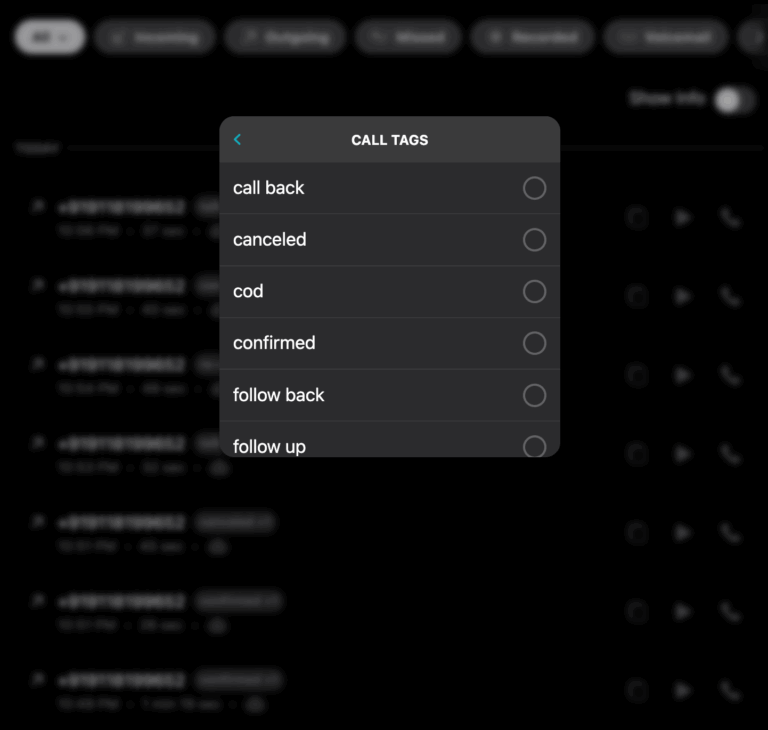
- Tags
- Notes
- Call summary
- Sentiment
- Callback requirement
The right team can then follow up with the customer.
AI Can Route Leads to the Right Team
Not every lead belongs to the same department.
A business may have:
- Sales
- Customer support
- Accounts
- Operations
- Appointment booking
An AI receptionist can classify the call and route it appropriately.
For example:
New sales inquiry → Sales
Complaint → Customer Support
Appointment request → Booking Team
Payment question → Accounts
This means your team receives leads that are relevant to them.
You can learn more about this in our guide on How AI Receptionists Route Calls to the Right Team.
Email Routing for Captured Leads
Jaxl Business Phone can classify calls into business-defined categories.
Once a call matches a category, the relevant team members can receive the caller’s details by email after the call.
For example:
New Sales Lead
The sales team receives:
Caller: Rahul
Reason: Website development inquiry
Requirement: Ecommerce website
Callback: Tomorrow afternoon
This gives the salesperson useful context before making the follow-up call.
AI Lead Capture for Different Businesses
Real Estate
An AI receptionist can capture:
- Buy/rent requirement
- Preferred location
- Property type
- Budget
- Viewing request
- Callback details
Instead of simply collecting a phone number, the business gets a basic picture of the prospect.
Salons
The AI can capture:
- Customer name
- Service required
- Preferred date
- Preferred time
- New/existing customer
- Appointment request
This can then move into the appointment-booking workflow.
Clinics
The AI can capture:
- Caller identity
- Appointment request
- Preferred timing
- General inquiry
- Callback request
For sensitive or complex situations, the call can be handed to the appropriate team.
Home Services
A customer might call a plumbing company and say:
“There’s a leak in my kitchen.”
The AI can capture:
- Customer identity
- Address
- Type of problem
- Urgency
- Preferred callback time
The service team then has useful information before contacting the customer.
Ecommerce
For ecommerce businesses, the AI can capture:
- Customer identity
- Order-related inquiry
- Product interest
- Delivery issue
- Return/refund request
- Callback requirement
The AI can also work with available customer and shop context to make conversations more relevant.
AI Can Capture Existing Customer Context Too
Not every call is from a new lead.
Existing customers may already have information associated with them.
For ecommerce businesses, useful customer context can include:
- Recent orders
- Delivery tracking
- Saved addresses
- Past call history
- Loyalty or membership information
- Pending payments
This allows the AI receptionist to handle a conversation with more context instead of treating every caller as a completely new prospect.
AI Lead Capture Works Even When Your Team Is Busy
One of the biggest advantages of AI is that it doesn’t require a staff member to stop what they’re doing.
Imagine your sales team is in a meeting.
A potential customer calls.
Instead of reaching voicemail, the AI receptionist can answer, understand the inquiry, capture the lead details, and create a follow-up opportunity for the team.
The lead doesn’t have to wait for someone to become available.
AI Lead Capture After Business Hours
Leads don’t arrive according to your office schedule.
A potential customer may call at:
- 8 PM
- 10 PM
- Sunday morning
- A public holiday
If nobody answers, that lead may disappear.
With an AI receptionist, the business can continue capturing customer inquiries outside normal business hours.
The team can follow up when they return.
This is particularly useful for businesses that receive high-value inquiries.
Capture More Than Just Contact Details
A good AI receptionist should capture context, not just contact information.
Compare these two records:
Basic
Name: Rahul
Phone: +91 XXXXX XXXXX
Contextual
Name: Rahul
Phone: +91 XXXXX XXXXX
Inquiry: Website development
Requirement: Ecommerce website
Timeline: Within two months
Callback: Tomorrow afternoon
The second record gives your team a much better starting point.
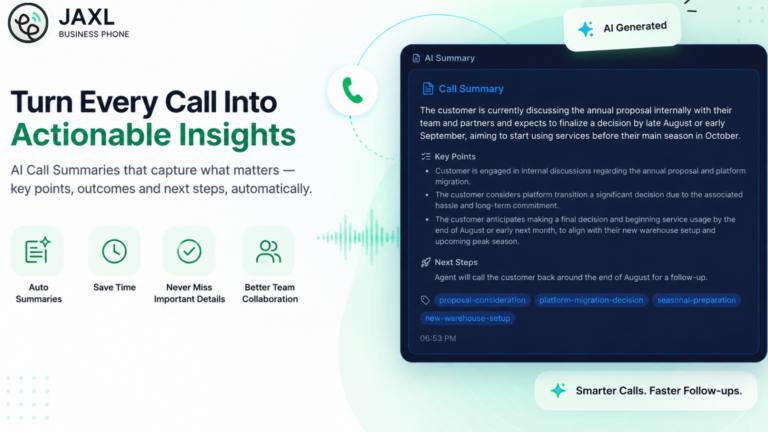
Call Summaries Make Follow-Up Easier
After a conversation, an AI receptionist can generate a call summary.
Instead of asking:
“What did this customer want?”
your team can quickly review the conversation summary.
This is particularly useful when a business receives a high volume of calls.
It can help employees:
- Prioritize leads
- Understand customer needs
- Prepare for callbacks
- Avoid asking customers to repeat information
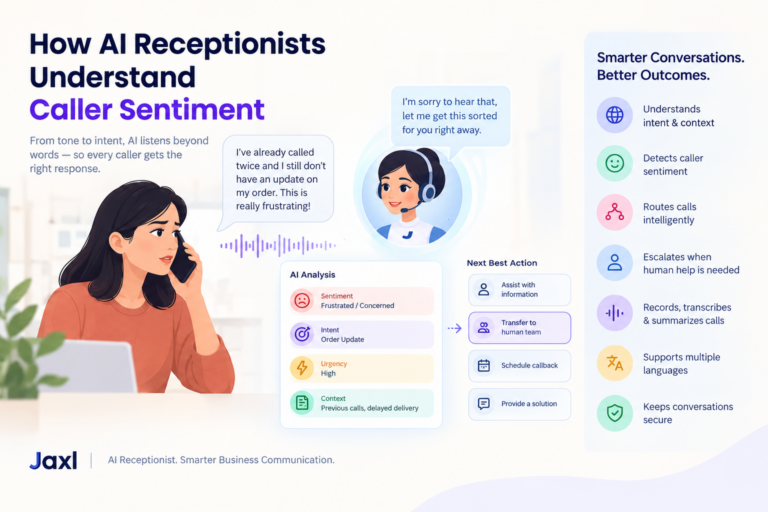
Caller Sentiment Can Add Another Layer of Context
Not all leads or customer calls have the same urgency.
Caller sentiment can provide another useful signal.
For example, a call may be identified as:
- Positive
- Neutral
- Frustrated
- Negative
A frustrated customer with a complaint may need faster human follow-up than someone making a routine inquiry.
How Jaxl Business Phone Helps Capture Leads
Jaxl Business Phone’s AI receptionist can capture caller information and turn phone conversations into structured business information.
Depending on your workflow, the AI can:
- Record caller identity
- Capture inquiries
- Schedule callbacks
- Record complaints
- Capture addresses
- Book appointments
- Record notes and tags
- Identify caller sentiment
- Generate call summaries
- Route calls to the appropriate team
- Send relevant caller details by email
This means the phone call becomes part of your business workflow rather than disappearing after the conversation ends.
AI Lead Capture + Human Follow-Up
AI doesn’t have to replace your sales or customer service team.
In fact, one of the strongest workflows is:
AI answers the call
↓
AI understands the inquiry
↓
AI captures caller details
↓
AI qualifies or categorizes the request
↓
AI routes the lead
↓
Human team follows up
The AI handles the repetitive first layer.
Your team handles the relationship.
Frequently Asked Questions
Can an AI receptionist capture leads from phone calls?
Yes. An AI receptionist can collect caller identity, reason for calling, requirements, callback preferences, and other relevant information.
Can AI qualify leads?
Yes. Businesses can configure the AI to ask relevant questions and capture information that helps the sales or service team understand the lead.
Can an AI receptionist collect a customer’s address?
Yes. Address capture can be part of the call workflow, particularly for home-service, delivery, and ecommerce businesses.
Can AI schedule callbacks?
Yes. An AI receptionist can capture a customer’s preferred callback time and pass that information to the appropriate team.
Can captured leads be sent to a sales team?
Yes. With appropriate call-routing and email-routing workflows, relevant caller details can be sent to the appropriate team members after the call.
Can an AI receptionist capture existing customer information?
Depending on the business integration and available context, the AI can work with information such as recent orders, delivery tracking, saved addresses, past call history, loyalty information, and pending payments.
Conclusion
A phone call can contain much more value than a name and phone number.
It can reveal what a customer wants, how urgently they need help, what product or service interests them, and what the business should do next.
AI lead capture helps businesses turn those conversations into useful, structured information.
Instead of:
Missed call → Lost opportunity
you can create:
Incoming call → AI conversation → Lead captured → Team notified → Follow-up
For small businesses, this can make every incoming call more valuable.
Turn Your Calls Into Actionable Leads
Jaxl Business Phone helps businesses use AI-powered phone conversations to capture caller details, understand inquiries, and keep teams informed.
With Jaxl Business Phone, you can:
- Capture caller identity
- Record customer inquiries
- Schedule callbacks
- Capture addresses
- Book appointments
- Route leads to the right team
- Send caller details by email
- Generate call summaries and notes
Learn more about Jaxl Business Phone at business.jaxl.com
Read More:
AI Receptionist vs Human Receptionist