India KYC Guide for Jaxl Business Phone
If you’re new to Jaxl Business Phone, you might wonder how to complete the KYC ( Know Your Customer ) formalities during your onboarding. Since the Jaxl Business Phone aims to simplify business calling operations, we have made the KYC process quick and easy
Prerequisites
Kindly take care of these points, before proceeding
- You have your Aadhaar number ready
- Your mobile number is linked with your Aadhaar you’ll receive an OTP for verification.
- You can access the official UIDAI website: https://myaadhaar.uidai.gov.in
How to Download Your Aadhaar Paperless Offline e-KYC (XML)
- Step 01: Visit the UIDAI official website: https://myaadhaar.uidai.gov.in
- Step 02: Login with Aadhaar : Enter your Aadhaar number and the OTP sent to your registered mobile number.
- Step 03: Go to “Offline e-KYC” or “Download Aadhaar Paperless Offline e-KYC (XML)” under the Aadhaar Services section.
- Step 04: Create a 4-digit Share Code – Example: 1234. (This code will be needed to open the downloaded file.)
- Step 05: Download the Aadhaar ZIP file : This file contains your Aadhaar XML.
Step-By-Step Guide To Help You Complete India KYC Mobile Successfully.
Important Note: Jaxl Business Phone works on mobile, web, and tablet, but KYC formalities can only be completed in the mobile app not on the web or tablet. Let me show you how
Jaxl Business Phone: Steps to Complete India KYC
Step 01: Open the Jaxl Business Phone app on your mobile device.
Go to Settings
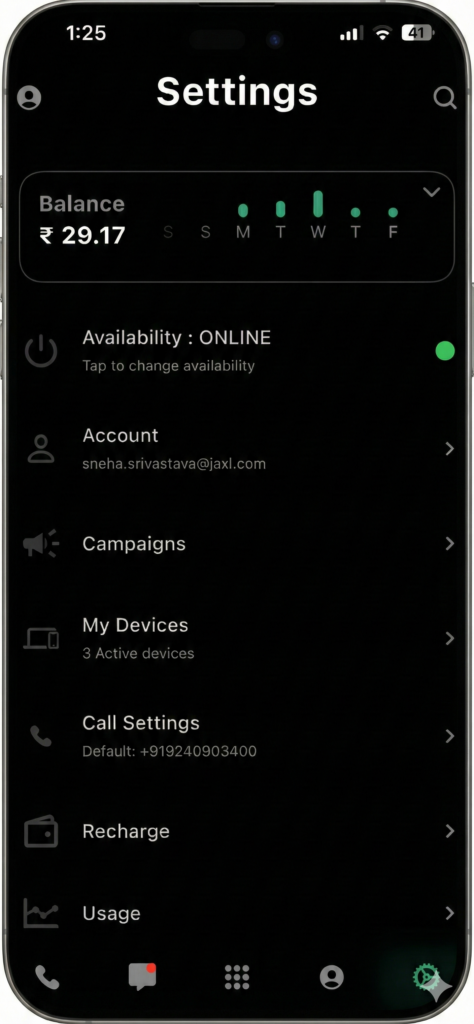
Step 02 Open the Account menu and choose KYC.

Step 03 – Select the country “India”

Step 04 – Read carefully and fill in all required details.
- In “Share Password” : You’ve to mention that code which you used to open your “Aadhaar XML File”

Step 05 – Click on ZIP to learn how to download and upload your ” Offline Aadhar in ZIP file format”.

Completing your India KYC on Jaxl Business Phone is simple, secure, and only takes a few minutes when done through the mobile app.
Download Jaxl Business Phone on Android
Download Jaxl Business Phone on iOS
If you have any other doubts about Jaxl Business Phone, Feel Free to visit our
Jaxl Business Phone FAQ